
white label aligner viewer
White Label Aligner Viewer: Put Your Brand on Every Treatment Plan
Why aligner brands use a white label aligner viewer, what private label orthodontic software should include, and how a custom domain builds trust.
· 4 min read · DentoSim
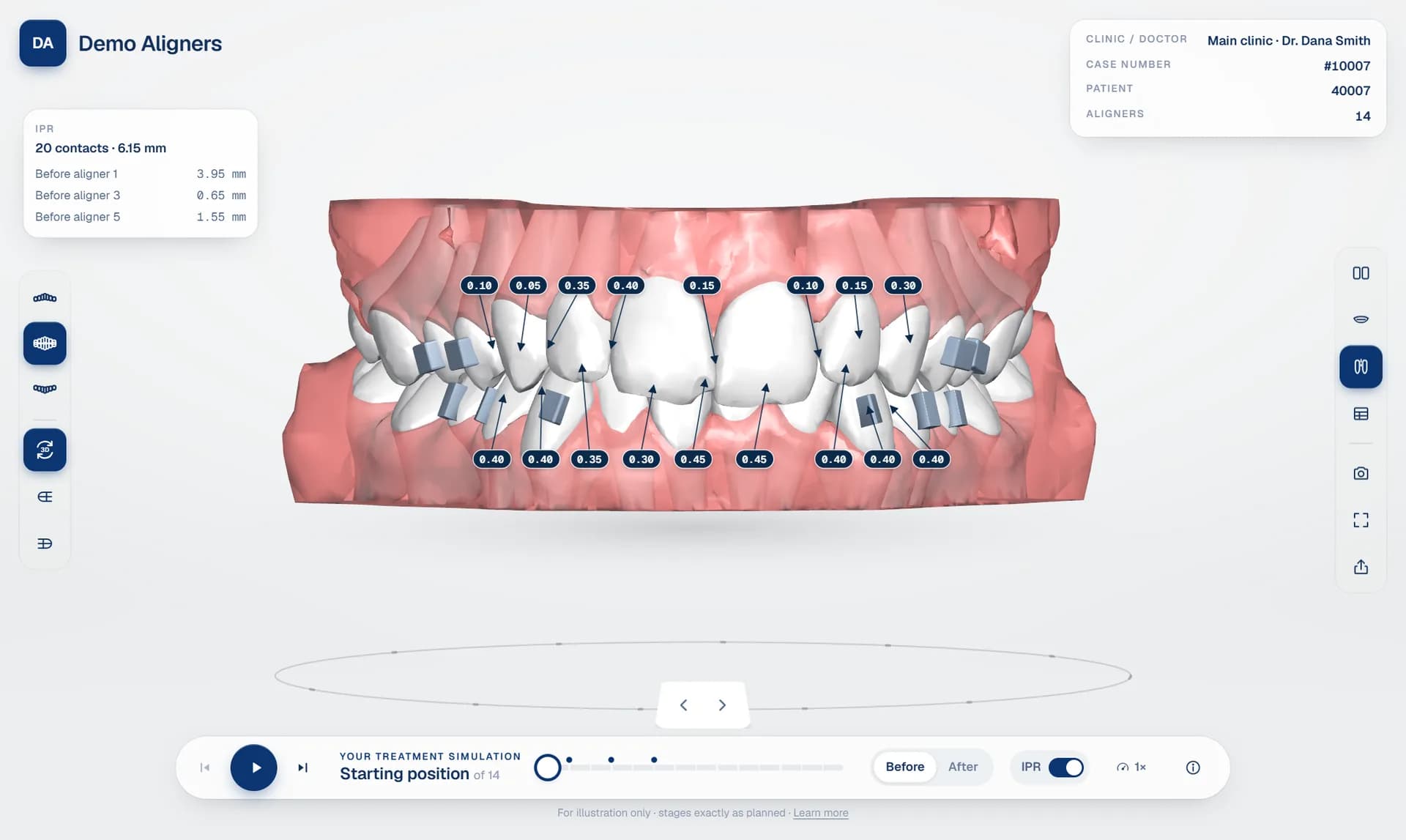
When a doctor opens a treatment plan from your lab, or a patient opens their simulation, whose brand do they see? For many aligner companies the honest answer is "the software vendor's": a vendor logo in the corner, a vendor domain in the address bar, vendor colours throughout.
That is a missed opportunity. Every case you send is a moment where a doctor or patient pays close attention to your work. A white label aligner viewer makes sure that attention lands on your brand. This guide explains why branding matters for aligner companies, what private label orthodontic software should include, and how to choose between a subdomain and a custom domain.
What "white label" means for an aligner viewer
A white label product is built by one company and presented under another company's brand. For an aligner viewer, that means the 3D simulation, the doctor portal and the patient link all look like they belong to your company. The software vendor stays in the background.
In practice, a fully white-labelled viewer replaces the vendor's identity in four places: the logo, the colours, the web address and the contact details. It should also extend to the emails doctors and patients receive.
Why branding matters for aligner companies
- Doctors remember you. Doctors work with several suppliers. Every plan they review in a portal carrying your name reinforces your relationship, rather than a third party's.
- Patients trust a consistent brand. The doctor recommends your aligners. If the simulation link then opens a page with an unfamiliar logo and domain, patients may hesitate, or even suspect the link is not genuine. A link that matches the brand the doctor recommended removes that doubt.
- You own the relationship. Your doctors are your customers. A branded portal keeps their attention on your company, your service and your support team.
- It supports premium positioning. A polished, branded digital experience signals quality, which matters when doctors compare aligner suppliers.
- It protects you if you change software. If doctors know the portal as your portal, changing the technology behind it does not change their experience of your brand.
What private label orthodontic software should include
Not every "white label" offer goes far enough. A complete private label setup should include:
- Your logo and colours on the doctor portal, the patient viewer and the emails your system sends.
- Your own domain. A custom domain aligner simulation, such as simulation.yourlab.com, looks far more professional than an address on the vendor's domain.
- Your company details (address, phone number and website) shown in the viewer, so patients and doctors know who to contact.
- No vendor branding on the screens doctors and patients see.
- Secure HTTPS on your domain, with certificates issued and renewed automatically.
- Links that keep working. If you rename your subdomain, earlier doctor and patient links should redirect to the new address rather than break.
Subdomain or custom domain?
There are two common ways to put the viewer at your own address.
A subdomain of the platform (for example yourlab.platform.com) is quick: it is usually available as soon as your account is set up, with nothing to configure on your side. It is already much better than a generic address, because your company name is in the link.
A custom domain (for example simulation.yourlab.com) is the strongest option. The address is entirely yours, and patients see only your brand. Setting it up usually means adding one DNS record with your domain provider. The platform then verifies the domain and issues a security certificate automatically.
Many labs start on a subdomain and move to a custom domain once they are sure about the platform. If you do, check that links sent on the old address still work.
A branded treatment plan viewer for doctors, not only patients
Branding is often discussed only for patients, but the doctor portal matters just as much. It is where your relationship with each doctor lives day to day: they receive notifications, review cases, request changes, approve plans and message your team there.
A branded treatment plan viewer turns that portal into part of your service. Doctors sign in to *your* portal, see *your* logo and contact *your* team. That is very different from being sent to a third-party tool. Read more about the doctor approval workflow.
Getting your brand assets ready
- Logo: a clean version that works on a light background, ideally as an SVG or a high-resolution PNG with a transparent background. A square mark is useful for small spaces.
- Colours: your main brand colour and a darker secondary colour. Check that white text is readable on your main colour.
- Contact details: the phone number, address, email and website patients and doctors should use.
- Domain: decide on the address (for example simulation.yourlab.com) and make sure you have access to its DNS settings.
Common mistakes
- Branding only the patient page. Doctors are your customers. Brand their portal and emails too.
- Using a low-resolution logo. It will look blurry on modern phone screens.
- Choosing colours with poor contrast. Buttons and text must stay readable.
- Forgetting contact details. A patient who has a question should know whom to ask.
Private label with DentoSim
Every lab on DentoSim gets its own subdomain from day one. With private label, the lab's logo, colours, custom domain and company details appear on every screen doctors and patients see, and DentoSim stays in the background. Certificates for custom domains are issued automatically once the domain is verified, and renamed subdomains keep earlier links working.
Contact us about private label, or register your lab to start on the standard plan and upgrade later. See also how to choose a 3D aligner treatment viewer.
Frequently asked questions
What is a white label aligner viewer?
A 3D treatment plan viewer that carries your company's logo, colours and domain instead of the software vendor's, so doctors and patients see only your brand.
Can I use my own domain for patient links?
Yes. With private label, patient and doctor links can run on your own domain, such as simulation.yourlab.com.
How do I connect a custom domain?
You add a DNS record with your domain provider. The platform verifies the domain and issues an HTTPS certificate automatically.
Will old links break if I change my subdomain?
Not with DentoSim. Links sent on an earlier subdomain redirect to the current one.
See it on your own treatment plans
DentoSim turns aligner treatment plans into 3D simulations for doctors and patients, under your lab's brand.