
aligner lab software
Aligner Lab Software: Building a Workflow From Upload to Approval
How aligner lab software organises clinics, doctors, patients and cases, and how to build a workflow from treatment plan upload to doctor approval and patient sharing.
· 4 min read · DentoSim
An aligner lab handles many cases at once, for many doctors at many clinics. Each case goes through several revisions before approval, and each revision has to reach the right doctor, be reviewed, and eventually be shown to the patient. Without a system, the status of each case lives in emails, chat messages, shared folders and someone's memory.
Aligner lab software puts that whole workflow in one place. This guide explains how to structure it, step by step, and what to look for in software that supports it.
Organise cases the way your lab works
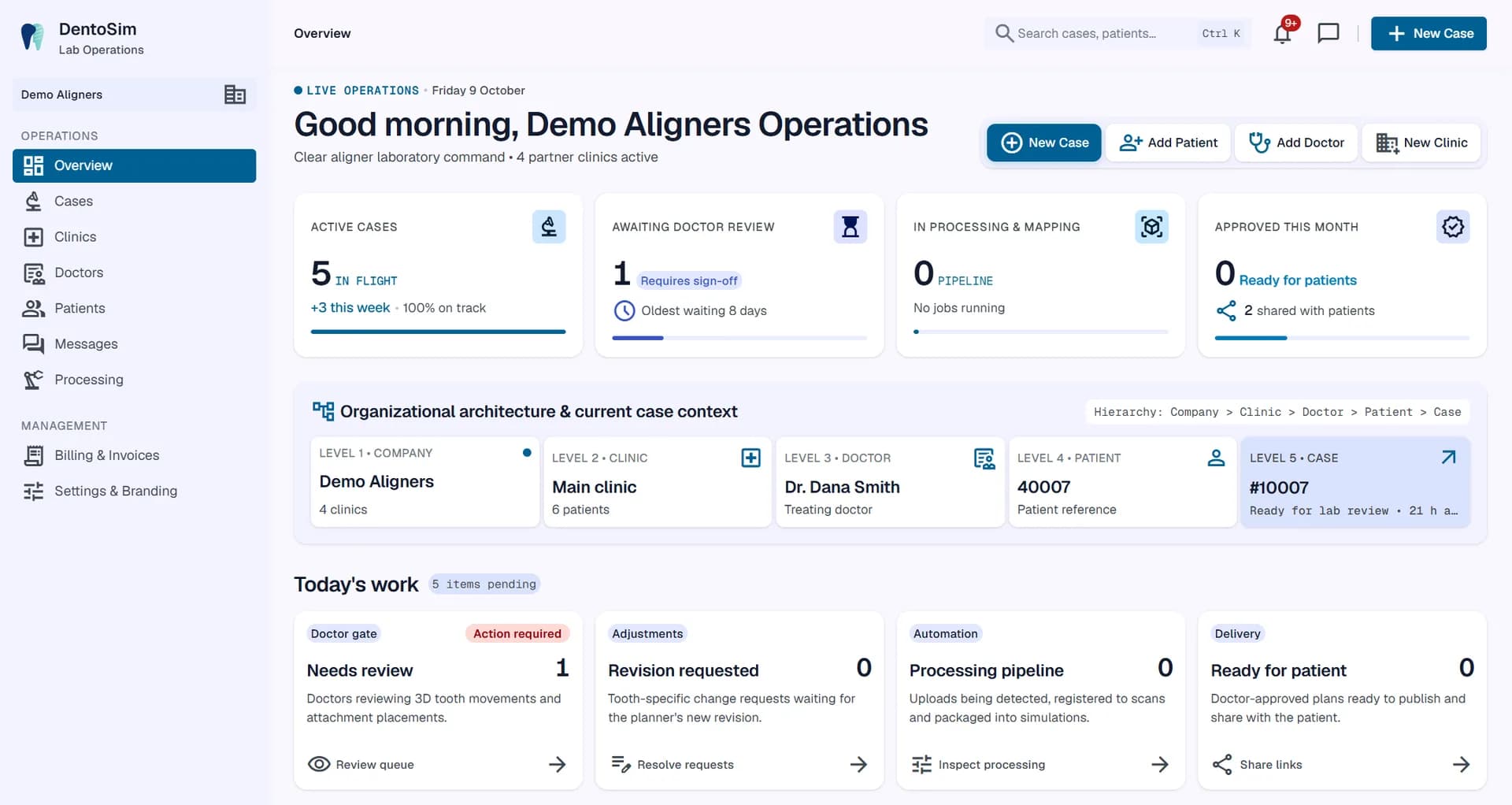
Aligner case management software should follow the real structure of your business, which for most labs looks like this:
- Clinic: the practice that orders aligners from you.
- Doctor: the treating dentist or orthodontist at that clinic. A clinic can have several doctors, and a doctor can work at more than one clinic.
- Patient: identified by a reference, and optionally a name, chosen by the lab.
- Case: the treatment for that patient.
- Revisions: each version of the plan, as it is refined after the doctor's feedback.
When the software mirrors this structure, everyday tasks become simple: find all cases for one clinic, see everything waiting for one doctor, or open the full history of a patient's case.
The four-step workflow
A clear workflow has four steps, each with a clear owner.
Step 1: Upload
The planner uploads the export from the planning software. It may be a zip, a folder or loose files, and it can be large, often hundreds of megabytes for a full set of stages. Good software accepts the export exactly as it comes out of the planning software, and uploads it in resumable chunks so a dropped connection does not mean starting again.
Exports from the top planning software should be recognised automatically. For anything unusual, you should be able to map the files once (which file is which stage and jaw) and save that as a template for the next case.
Step 2: Process
Processing should be automatic. The platform scans the files for viruses, detects the stages, checks units and orientation, separates teeth, gums and attachments, and builds a compact 3D simulation that opens in any browser. Where intraoral scans are included, the starting position can be registered to them so the bite on screen matches the patient's real bite.
If anything looks wrong (a missing stage, a jaw that does not match), the software should flag it before the plan reaches a doctor.
Step 3: Review
The planner checks the simulation and sends it to the treating doctor. The doctor reviews it in 3D, with IPR, attachments and the movement table, and either approves or requests changes, ideally on a specific tooth at a specific stage. Questions go through chat on the case. See the orthodontic treatment plan viewer and the doctor approval platform.
If changes are requested, the planner updates the plan in the planning software and uploads a new revision, and the cycle repeats.
Step 4: Share
Once approved, the lab or clinic sends the patient a private link, by WhatsApp, as a link or as a QR code. The link can have a PIN and an expiry date, and every view is recorded. See sharing treatment plans securely and before and after simulations.
Know what needs attention today
A good dashboard answers one question first: what needs attention today? It should show:
- cases awaiting doctor review, and how long the oldest has been waiting;
- change requests waiting for a new revision;
- uploads still processing, or needing a file mapping;
- approved plans ready to share with the patient.
Notifications cover the rest: when a doctor approves, requests changes or sends a message, and when a patient opens their simulation. Each person should see only the notifications relevant to their role.
Treatment plan sharing for aligner labs
Sharing is where many labs lose time and control. Files go out by email or file-sharing services, versions get mixed up, and there is no record of who saw what.
With treatment plan sharing for aligner labs built into the same system, every doctor signs in to see only their own cases, always the current revision. Every patient link can have a PIN, an expiry date and a full view log, and can be revoked at any time. Nothing leaves the platform as a loose file.
Roles for your team
Not everyone in the lab needs every permission. A sensible role structure looks like this:
- Owner: everything, including billing.
- Admin: runs the lab: team members, branding, domains, clinics and cases.
- Operations: clinics, doctors, patients, cases and patient sharing.
- Planner: uploads revisions, maps files, sends plans to doctors and chats with them.
- Viewer: read-only access.
- Doctor: reviews and approves their own cases, and proposes adjustments.
Measuring the workflow
Once the workflow is in one system, you can see where cases wait. Useful questions to ask each month: how long do cases wait for doctor review? How many revisions does a typical case need? Which doctors approve quickly, and which need more support? The answers show where a short call, a clearer note or a template could save days.
Start with your own cases
DentoSim is aligner lab software built around this workflow: clinic, doctor, patient and case structure, automatic processing, a 3D aligner treatment viewer, doctor approval, chat, patient links and a dashboard of today's work, all under your brand. Register your lab and try it on real cases with the free starter cases.
Frequently asked questions
What is aligner case management software?
Software that organises aligner cases by clinic, doctor and patient, tracks every revision, and moves each case from upload through doctor approval to patient sharing.
Does every doctor see all cases?
No. In DentoSim each doctor sees only their own cases, while lab staff see the cases their role allows.
What happens if an upload is interrupted?
Uploads are sent in chunks and resume where they stopped, so a dropped connection does not mean starting again.
What if my export is not recognised automatically?
You map the files once (which file is which stage and jaw) and save it as a template, so the next export of that kind is recognised automatically.
See it on your own treatment plans
DentoSim turns aligner treatment plans into 3D simulations for doctors and patients, under your lab's brand.