
aligner attachment viewer
Aligner Attachments in 3D: What Doctors and Patients Should See
Why an aligner attachment viewer matters: showing attachments on the right teeth and stages, and explaining them to patients before treatment starts.
· 3 min read · DentoSim
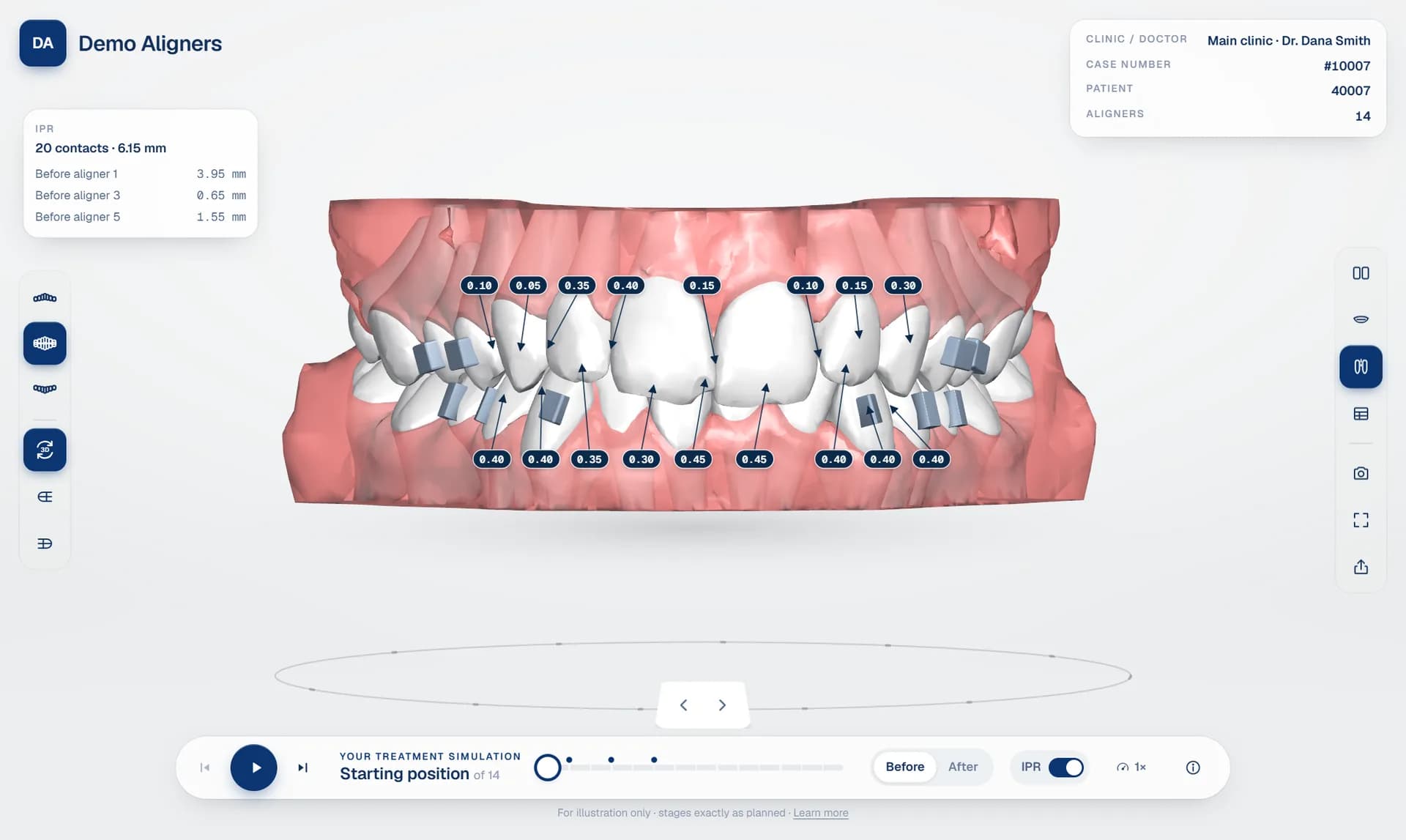
Attachments are small, tooth-coloured composite shapes bonded to the surface of selected teeth. The aligner is shaped to fit over them, giving it something to push against so it can deliver movements that a smooth tooth surface would not allow.
They are part of almost every clear aligner plan, and both doctors and patients ask about them. Doctors need to confirm the attachments suit the planned movements. Patients want to know what will be on their teeth. An aligner attachment viewer shows them clearly on the 3D model, at the right stage.
Why attachments matter
Aligners are good at tipping teeth, but some movements need extra grip. Attachments help with movements such as rotations of rounded teeth, extrusions, root movements and keeping control of teeth while others move. Their shape, size and position are chosen in the planning software as part of the treatment plan.
Because they are so closely linked to the movements, attachments are one of the first things an experienced doctor looks for when reviewing a setup.
What the doctor needs to check
- Which teeth have attachments, upper and lower, and whether that matches the doctor's expectations for this case.
- From which stage. Some attachments are placed at the start, others later in treatment, for example after IPR or after other teeth have moved.
- Whether they make sense with the movements in the tooth movement table, for example on teeth with large rotations or extrusions.
- Whether they interfere with anything else in the plan, such as IPR at a neighbouring contact. See aligner IPR visualisation.
- How many there are in total, since each one adds chair time at the bonding appointment.
Separate attachments from teeth
In many planning software exports, attachments are merged into the tooth surface, or into one combined model per stage. Shown that way, they are hard to see: the same colour and material as the tooth, with no way to hide them.
A good simulation platform separates attachments into their own parts. They can then be shown in a distinct colour, switched on and off, and moved correctly with the tooth they are bonded to during playback. When the doctor steps through the aligners, the attachments stay exactly where they belong.
Attachments during playback
In a smooth, staged aligner treatment animation, each tooth moves as a rigid body between stages. Attachments should follow their tooth precisely: if tooth 44 rotates, the attachment on 44 rotates with it. Viewers that simply swap whole models between stages can make attachments appear to jump or flicker, which is distracting and makes them hard to follow.
Explaining attachments to patients
Patients are often surprised by attachments on the day they are bonded. Some worry about how they will look, others about whether they will be permanent. Showing attachments on the simulation beforehand avoids that surprise.
In a before and after simulation, the patient sees where attachments will be placed and understands that they help the aligners work. The doctor can explain that they are tooth-coloured, small and removed at the end of treatment. Seen as part of the plan, attachments are much less likely to feel like an unexpected extra.
Common questions patients ask
- Will people see them? They are tooth-coloured and usually much less visible than patients expect.
- Are they permanent? No. They are removed and polished away at the end of treatment.
- Do they hurt? Bonding is usually painless, though the doctor is the right person to answer this for each patient.
- Why do I need them? They help the aligners grip the teeth and move them as planned.
Tips for labs
- Use a clear colour for attachments in the viewer, distinct from teeth, so doctors can spot them instantly.
- Mention attachment changes in your note to the doctor when you send a new revision.
- Check the attachment count against the plan for the first cases you upload to any new platform.
- Let doctors hide attachments when they want to see the tooth surface underneath.
Attachments, IPR and movements together
Attachments, IPR and tooth movements tell one story. Seeing them together in a 3D aligner treatment viewer helps the doctor judge the whole plan rather than each part separately.
In DentoSim, attachments are separated from the teeth during processing, shown in their own colour, switched on and off in the lab and doctor view, and they follow their tooth through every stage of playback. Explore the viewer or register your lab.
Frequently asked questions
Why do aligners need attachments?
Attachments give the aligner something to grip, which helps it deliver movements such as rotations and extrusions.
Can attachments be hidden in the viewer?
Yes. In DentoSim's lab and doctor view, attachments can be switched on and off.
Do attachments move during playback?
Yes. Each attachment follows the tooth it is bonded to through every stage.
Are attachments permanent?
No. They are removed at the end of treatment. The treating doctor can explain the details to each patient.
See it on your own treatment plans
DentoSim turns aligner treatment plans into 3D simulations for doctors and patients, under your lab's brand.